
The short version
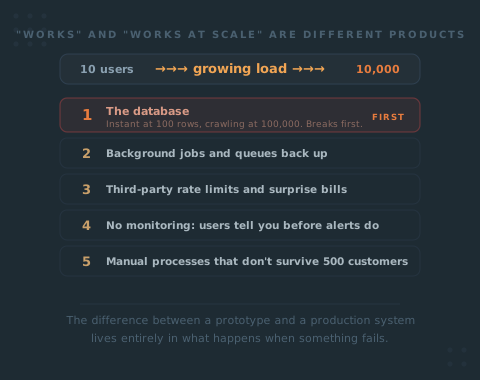
Works and works at scale are two different products, and the gap is invisible until real users arrive. Things break in a rough order: the database first (queries that were instant at 100 rows crawl at 100,000), then background jobs back up, then third-party limits and surprise bills, then you learn about outages from angry users because you have no monitoring, then manual processes that were fine at 10 customers, then security holes once you are worth attacking, and finally the one developer now unofficially on call around the clock. The difference between a prototype and a production system lives entirely in what happens when something fails.
Your product works. The demo is clean, the first users signed up, nothing is on fire. Then one ordinary Tuesday it slows to a crawl, and nobody can tell you why.
Here is the uncomfortable part: “works” and “works at scale” are two completely different products, and the gap between them is invisible until real users show up and start pushing. The failures that follow are not random, either. They tend to arrive in close to the same order, system by system, almost regardless of who built the thing or how carefully. So this is less a warning than a map.
Nothing in your code changes on the day it breaks. The conditions change. More data, more people, more of the unpredictable behaviour you never tested for, all at once. The exact same query that returned instantly last month now takes ten seconds, and nobody touched it.
Here is roughly what breaks, in the order it tends to break as you grow. Not to scare you. So you can see it coming and pay for it on your schedule instead of during an outage.
The Database Goes First
Almost every scaling failure I have seen starts in the same place. The database.
Here is why. When your developer built the thing, they tested it against a few hundred rows. Every query came back instantly, because searching a few hundred of anything is instant. Nobody added indexes, because nobody needed them. An index is a shortcut the database uses to find rows fast, and at small scale there is nothing to shortcut.
Then you get real. A hundred thousand rows. A million. Now every time a user loads their dashboard, the database reads the entire table to find their handful of records, because there is no index telling it where to look. What felt instant becomes a three-second wait, then a ten-second wait, then a timeout. The app doesn’t crash dramatically. It just gets slower and slower until it feels broken.
What you see as the founder: the app “feels sluggish,” support tickets about pages that “won’t load,” and it gets worse the more successful you are. That last part is the cruel bit. Growth makes it worse.
What to ask for: “Which of our common queries are missing indexes, and how do they perform against production-sized data, not test data?” A competent engineer can answer this in an afternoon with the tools every database ships with. If the answer is a blank stare, that is your signal.
Then the Background Work Backs Up
Plenty of what your product does doesn’t happen while the user watches. Sending the welcome email, generating the invoice, resizing the uploaded image, syncing to your CRM. That work runs in the background.
At ten users, “background” often means the work just happens inline, right there in the request, and nobody notices the extra half second. At scale, that half second times thousands of simultaneous actions becomes a pile-up. Jobs queue faster than they finish. Welcome emails arrive four hours late. The invoice for a payment that cleared this morning gets generated tonight. Users assume it’s broken, because from where they sit, it is.
The fix is a proper queue: a system that accepts the work, hands back control to the user immediately, and chews through the backlog at a sane pace with retries when something fails. Most MVPs launch without one because at launch you don’t need one.
- Slow work runs inline; the user waits for it
- A failed job vanishes silently, no retry, no record
- Nobody knows the queue is backing up until users complain
- One bad task can stall everything behind it
- Slow work is queued; the user gets control back instantly
- Failed jobs retry, then surface somewhere a human sees them
- Queue depth is monitored, so a backlog is visible early
- One bad task fails on its own without blocking the rest
The difference between a prototype and a production system lives almost entirely in that right-hand column. It is not what happens when things go well. It is what happens when something fails.
Third-Party Limits and the Surprise Bill
Your product leans on other people’s services. Email delivery, payments, SMS, maps, an AI model, a data provider. Each one works flawlessly in testing, because in testing you call it twelve times. Two things change at scale, and both cost you.
First, rate limits. Most of these services cap how many requests you can make per second. You never hit the ceiling with twelve calls. You hit it hard when a thousand users trigger the same action in the same minute, and suddenly the provider starts refusing your requests. Emails don’t send. Maps don’t load. The feature that depended on that provider just stops, for reasons that have nothing to do with your code.
Second, the bill. Usage-priced services are cheap at MVP volume and quietly enormous at scale. The founder who never set a spending alert finds out when the invoice lands.
A real one: a service we had used for ages, steady monthly bill, nobody touching it. One month it quadrupled. Same service, same usage. The cause was a default setting, an option we never needed, billed by usage, switched on out of the box, and nobody was watching billing closely enough to catch it. An hour of digging and one setting change put it back. Now multiply that across hosting, email, SMS, storage, and monitoring, and you have a bill that climbs on its own until someone finally looks.
Every paid third-party service should have a usage cap and a spend alert before you scale, not after the invoice.
What to ask for: “What are the rate limits on every external service we use, what happens in our product when we hit one, and do we have a spending alert on each?” The answer “it just errors” is not acceptable for anything a user can see.
You Find Out From Angry Users
Here is the failure underneath all the others, and it is the one that hurts most. You have no monitoring, so you learn about every outage the same way: an angry user tells you.
Think about what that means. The database is timing out for two hours before anyone emails you. The payment integration has been silently failing since lunch. A whole segment of users can’t log in and you find out from a furious tweet. By the time you know, the damage is done and public, and your only information comes from the handful of people annoyed enough to complain. For every one who writes in, many just leave.
Red flag
No monitoring means you are always the last to know
A prototype tells you nothing when it breaks. It just breaks, and waits for a human to notice. Error monitoring catches exceptions the moment they happen and alerts you. Uptime monitoring pings your site every minute and tells you the instant it goes down. Performance monitoring shows you the slow query trending worse for a week before it becomes an outage. None of this is exotic or expensive. Its absence is the single clearest sign you have a prototype in production, not a production system.
Monitoring does not stop things from breaking. Nothing stops things from breaking. What it buys you is finding out first, fixing it before most users notice, and never again learning that your product is down from someone who is done with you.
The Manual Work That Quietly Stops Scaling
Some of what keeps your product running isn’t code at all. It’s you, or someone on your team, doing a thing by hand.
Approving each new signup. Copying data between two tools every morning. Manually issuing a refund. Onboarding each customer over a call. At ten customers this is completely fine, and honestly it is often the right call, because automating early is a waste when you don’t yet know the process is right. The trap is that it works so well you never revisit it. Then you have five hundred customers and the “quick morning task” is a full-time job nobody has time for, done by a person who now cannot take a day off.
There is a second, quieter failure that arrives around the same time, and it is the one founders least expect: security. Nobody bothers attacking a product with fifty users. The moment you are visibly successful, you are worth the effort. The shortcuts taken to launch fast, the permission check that was “good enough,” the admin route that assumes only staff would ever find it, all start to matter precisely because you now have something worth taking.
When we relaunched a fitness platform, subscriptions started growing, and so did Stripe disputes. They looked completely legitimate at first: real-looking profiles, real behaviour, signing up and using the trial. They were fraudsters running stolen card numbers through our free trial to see which cards still worked. It is common enough that Stripe has a whole page about it, which of course nobody goes looking for until it is happening to them. It pulled in the whole team for weeks. None of it showed up before we had real traffic, because you only become worth attacking once you are live.
The rule of thumb: any manual process a human does more than a few times a day is a scaling risk, and any security shortcut is a debt that comes due the day you get noticed. Neither is urgent at launch. Both become urgent at exactly the moment you are least able to spare the time. Decide which ones you are keeping on purpose and which ones you are just ignoring.
The One Developer Now On Call Forever
Everything above lands on a person. Usually one.
If you have a single developer, they built the thing, and now they are the only one who understands why it breaks. So when it breaks at 11pm, they are the one who fixes it. When it breaks on Saturday, same. There is no rota, no second person who knows the system, no plan for the week they want a holiday. They are unofficially on call around the clock, and nobody decided this on purpose. It just happened, one incident at a time.
This is not only a technical problem. It is a human one, and it is how you lose the person you can least afford to lose. Burnout is not dramatic. It is quiet, and then they hand in their notice, and the one brain that held your whole system walks out the door.
The most memorable version in my own career: a late-night deploy that both the founder and I knew we were rushing, an algorithm change that looked fine, pushed, went to sleep. I woke up to a traffic jam at the Port of Los Angeles. The change had started routing the wrong trucks to the wrong places and they piled up. It made the news. Some deploys can wait until morning. That is the whole 2am lesson in one story.
A production system is not just code that survives load. It is a setup where the person who built it can sleep, take a holiday, and get hit by nothing worse than a bus without your company going down with them.
The fixes are unglamorous and they are exactly what “production-ready” actually means. Alerts that route somewhere sane instead of one person’s phone. Documentation so a second engineer can respond. Automated recovery for the failures that repeat. A real answer to “what happens when the one person who knows this is unreachable?”
What to Harden Before You Scale
You cannot prevent every failure, and you shouldn’t try. The point is to make the predictable ones cheap instead of catastrophic. Before you push hard on growth, get these in place, because every one of them is cheap to add early and brutal to retrofit during an outage.
Index the database on the columns you actually filter and sort by. Move slow work onto a real queue with retries. Set a rate-limit plan and a spending alert on every paid third-party service. Add error, uptime, and performance monitoring so you find out first. Write down the manual processes and decide which to automate before the volume forces it. Close the obvious security gaps now that you are worth attacking. And make sure more than one human can respond when something breaks.
None of this is about perfection. It is about knowing which surprises you are prepared for and which ones you are quietly betting won’t happen. At Hurricane we call the period right after launch stabilization, and this list is most of what it contains. It is boring, it is invisible to users when it is done right, and it is the entire difference between scaling and scrambling.
Run the checklist below honestly. If you find yourself unsure which of these you have covered and which you are just hoping about, that uncertainty is the useful signal, and it is exactly the conversation we are happy to have.
Is your product ready for real scale?
Mark anything that is true right now.
You have a prototype in production. That is normal right after launch, but push growth now and the failures above are coming. Better to know.
Get future guides direct to your inbox